
Publishing Your Review

Making the Magic Happen
Now that you’ve written your review, it’s time to publish it for the whole world to see. And thanks to the Write App Reviews platform, that’s super easy to do.
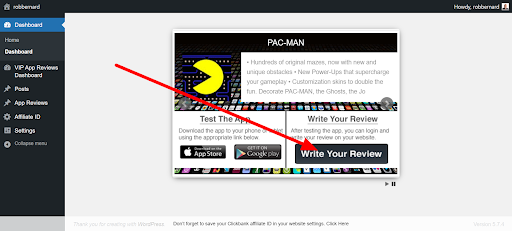
The first step is to log into the platform and find the product you are reviewing. Then click on ‘Write Your Review.’
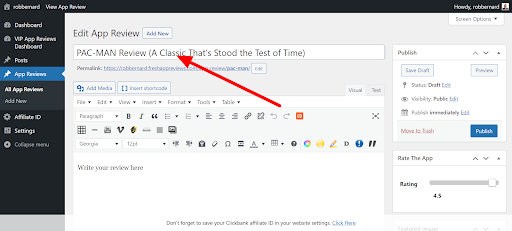
This will open up a new review page. You will see that the product name has been inserted into the Title field for you. You can also add further information to make the title interesting.
Then paste the text of your review into the text block lower down the page.
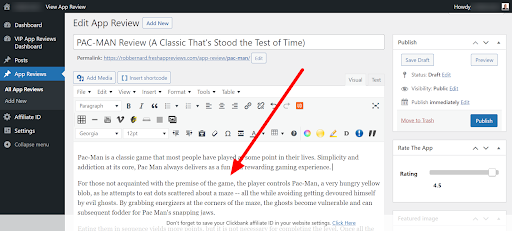
Read through the post carefully to see if you are happy with the way it looks. Delete any unwanted blank spaces and adjust the paragraphs until everything looks good.
The next step is to rate the product. Look for the ‘Rating’ slider over on the right. Adjust this left or right until it shows the rating you want to give.
Notice that we’ve also added a featured image for you automatically. This will display alongside your review. You don’t have to do anything...we’ve made everything as simple as possible.

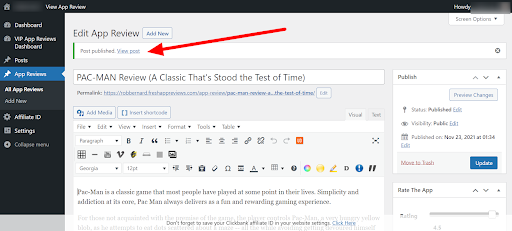
Once you’ve rated the product, give everything a final check. If it all looks good, click ‘Publish’ at the top right of the page.
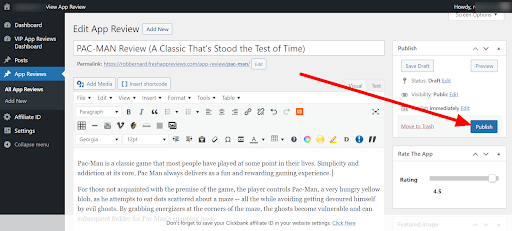
The post will then be published live on the Internet. You can view your new money-making review by clicking ‘View Post.’
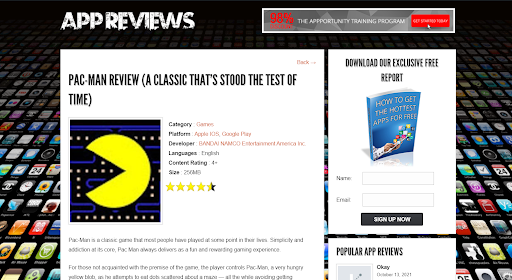
Now you can see how your post looks to the big, wide world. Well done, you have published your first review!
Copyright 2021 - WriteAppReviews - All Rights Reserved